
User manual
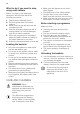




• If the rinse aid indicator is on, fill the
rinse aid dispenser.
3. Load the baskets.
4. Add the detergent. If you use multi-
tablets, activate the option Multitab.
5. Set and start the correct programme for
the type of load and the degree of soil.
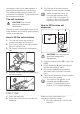
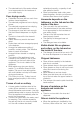
Using the detergent
20
30
A
B
C
CAUTION! Only use detergent
specifically designed for
dishwashers.
1. Press the release button (B) to open the
lid (C).
2. Put the detergent, in powder or tablets,
in the compartment (A).
3. If the programme has a prewash phase,
put a small quantity of detergent on the
inner part of the appliance door.
4. Close the lid. Make sure that the release
button locks into position.
Setting and starting a
programme
The AUTO OFF function
This function decreases energy
consumption by deactivating automatically
the appliance when it is not operating.
The function comes into operation:
• 5 minutes after the completion of the
programme.
• After 5 minutes if the programme has
not started.
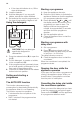
Starting a programme
1. Keep the appliance door ajar.
2. Press the on/off button to activate the
appliance. Make sure that the appliance
is in programme selection mode.
3. Press repeatedly or until
the display shows the number of the
programme you want to start. The
display will show the programme
number for approximately 3 seconds
and then show the programme
duration.
4.
Set the applicable options.
5.
Close the appliance door to start the
programme.
Starting a programme with
delay start
1.
Set a programme.
2.
Press
again and again until the
display shows the delay time you want
to set (from 1 to 24 hours).
The delay indicator comes on.
3. Close the appliance door to start the
countdown.
When the countdown is completed, the
programme starts.
Opening the door while the
appliance operates
If you open the door while a programme is
running, the appliance stops. When you
close the door, the appliance continues
from the point of interruption.
Cancelling the delay start while
the countdown operates
When you cancel the delay start you have
to set the programme and options again.
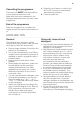
Press and hold RESET until the appliance
is in programme selection mode.
12