
User guide




Getting started
20
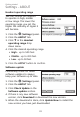
Incompatible version alert display
If the current Skype or
Lync installed on your
computer is not compatible
with this software, the
Skype/Lync status bar in the
(Call Connectivity) panel
shows Incompatible version.
You can enable or disable this
alert message.
Click the (Settings) panel.
Click the SOFTPHONE tab.
Click q in the Incompatible version alert display drop down
menu under Skype/Lync section.
Click Enable or Disable.
Click APPLY to confirm.
1.
2.
3.
4.
5.
Enable
Disable
Settings - SOFTPHONE