
User`s manual




15
Getting started
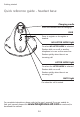
VOLUME
Press the volume keys on the side of
the headset base to adjust the speaking
volume when on a call.
MODE
Press to choose between the NO
LIFTER MODE or LIFTER MODE
when the headset is not in use. The
corresponding light turns on.
LIFTER AUDIO ADJUST
Adjust the switch to choose the best
headset audio �uality when using
LIFTER MODE. (See page 12 of this
�uick start guide or the handset lifter
user's manual for more information.
You can download the manual at
www.telephones.att.com.)
Quick reference guide - headset base