Quick start guide TL7610/TL7611 DECT 6.
Getting started Battery installation Install the battery as shown below. After installing the battery, you may be able to make and receive short calls. For optimal performance, charge the headset battery for at least six hours before use. When not in use, recharge the headset by returning it to the headset base. 1. Insert the battery into the battery compartment with the label THIS SIDE UP facing up. 1 2 2.
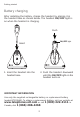
Getting started Battery charging After installing the battery, charge the headset by placing it in the headset base as shown below. The headset ON/OFF light is on when the headset is charging. Push ON/OFF light Insert 1. Insert the headset into the headset base. 2. Push the headset downward until the ON/OFF light on the headset turns on. IMPORTANT INFORMATION Use only the supplied rechargeable battery or replacement battery (model BT191545). To obtain a replacement battery, visit our website at www.
Getting started Installation preparation If you subscribe to high-speed Internet service (digital subscriber line - DSL) through your telephone lines, you must install a DSL filter between the telephone line cord and the telephone wall jack. The filter prevents noise and caller ID problems caused by DSL interference. Please contact your DSL service provider for more information about DSL filters. For customer service or product information, visit our website at www.telephones.att.
Getting started Headset base installation IMPORTANT: If you purchased model TL7611, see the TL7000 handset lifter manual for installation instructions. Optional accessories The following optional accessories are compatible with your headset and base: • The TL7000 is a handset lifter with ����������������������� optional external ring detector. • The TL7600 is an expansion headset (up to two headsets can be used with the same headset base).
Getting started Headset base installation Installation options IMPORTANT: If you purchased model TL7611, or if you purchased a model TL7000 handset lifter (purchased separately), follow the installation instructions in the TL7000 handset lifter manual and then ������������������������ skip to����������������� page 13 of this quick ������������������ start guide.
Getting started Headset base installation Installation options Digital subscriber line (DSL) If you subscribe to high-speed Internet service (digital subscriber line - DSL) through your telephone lines, you must install a DSL filter between the telephone base and the telephone wall jack. The filter prevents noise and caller ID problems caused by DSL interference. Please contact your DSL service provider for more information about DSL filters.
Getting started Headset base installation Before installing the headset base: Remove the rear bottom piece of the headset base by pushing it away from the base (as shown in Figure 1). Figure 1 Install the headset base as shown on the following pages. After completing installation option 1, 2 or 3: Slide the rear bottom piece towards the headset base until it clicks into place (as shown in Figure 2).
Getting started Headset base installation Option 1: Headset base with corded or cordless phone installation (TL7610) 1. Plug the small end 2. Plug one end of the of the headset base power adapter into the POWER jack (green dot) at the back of the headset base. telephone line cord into the TEL WALL JACK (red dot) at the back of the headset base. 3. Plug the other end of the telephone line cord into the line splitter. Telephone line cord 4.
Getting started Headset base installation Option 2: Headset base stand-alone installation (TL7610) In order to make calls, you need a telephone plugged into the same telephone line or a dial pad (TL7601 sold separately). 1. Plug the small end of 2. Plug one end of the the headset base power adapter into the POWER jack (green dot) at the back of the headset base. telephone line cord into the TEL WALL JACK (red dot) at the back of the headset base. Telephone line cord 3.
Getting started Headset base installation Option 3: Headset base with corded phone for multiple line system or digital business system installation (TL7610) With this installation, you can make and receive calls using the LIFTER MODE without a lifter. Make sure the LIFTER AUDIO ADJUST setting is correct (see page 12). 1. Plug the small end of 3. Unplug the curly the headset base power adapter into the POWER jack (green dot) at the back of the headset base. handset cord from the telephone.
Getting started Headset base installation No lifter mode or lifter mode There are two answer modes available on the headset base. The current mode is indicated by two lights on the front of the headset base named NO LIFTER MODE and LIFTER MODE. MODE • When plugging your headset base into the telephone wall jack (installation option 1 or 2), make sure the headset base mode is set to NO LIFTER MODE.
Getting started Headset base installation Adjust lifter audio MODE LIFTER MODE light ON/OFF . Press MODE on the headset base to change the mode if the LIFTER MODE light is not on. Make sure that the LIFTER MODE light on the headset base is on. 2. Lift the corded handset from the telephone cradle. 3. After you install and charge the battery (see pages 14-15), put the headset next to your ear. 4. Press ON/OFF on the headset and listen for the dial tone. 5.
Getting started Quick reference guide - headset ON/OFF Press to make and/or answer a call, and to end a call. The light is on when the headset is charging in the headset base. The light flashes slowly when you are on a call, or flashes quickly when there is an incoming call. VOLUME +– Press the volume key on the side of the headset to adjust the listening volume when on a call. MUTE/FLASH Press to mute the microphone during a call. Press and hold to receive call waiting during a call.
Getting started Quick reference guide - headset base Charging cradle Insert the headset here for charging. PAIR Press to register or de-register a headset. NO LIFTER MODE light On when NO LIFTER MODE is selected. Flashes while on a call or another telephone is in use on the same line. Flashes quickly when there is an incoming call. LIFTER MODE light On when the LIFTER MODE is selected. Flashes while on a call. Flashes quickly when there is an incoming call. MUTE light On when the call is muted.
Getting started Quick reference guide - headset base LIFTER AUDIO ADJUST Adjust the switch to choose the best headset audio quality when using LIFTER MODE. (See page 12 of this quick start guide or the handset lifter user's manual for more information. You can download the manual at www.telephones.att.com.) VOLUME Press the volume keys on the side of the headset base to adjust the speaking volume when on a call.
www.telephones.att.com © 2008 Advanced American Telephones. All rights reserved. AT&T and the AT&T logo are trademarks of AT&T Intellectual Property II, L.P. d/b/a AT&T Intellectual Property licensed to Advanced American Telephones, San Antonio, TX 78219. Printed in China. Issue 3 AT&T 12/08.