
Manual






16
Telephone operation
Options while on calls
Hold
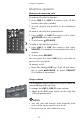
To put a call on hold while on calls:
• Press HOLD.
You can place the handset in the telephone base
after a call is put on hold. The line on hold will
flash slowly in red.
To return to the call:
Press the appropriate LINE key and lift the hand-
set.
-OR-
Press the appropriate LINE key then press
HEADSET if a headset is connected.
-OR-
Press the appropriate LINE key then press
SPEAKER.
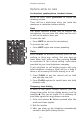
Switch between lines during a call
During a call, you can make or answer a call on the
other line by pressing HOLD. The line on hold will
flash slowly in red. Use the HOLD and LINE keys
to switch back and forth between calls as often as
necessary.
Examples:
While using Line 1, and Line 2 rings:
Press HOLD to put Line 1 on hold. The line on
hold will flash slowly in red.
Press LINE 2 to answer the other call.
To disconnect Line 2 and return to the first call,
press LINE 1.
While using Line 2, Line 1 rings:
Press HOLD to put Line 2 on hold. The line on
hold will flash slowly in red.
Press LINE 1 to answer the other call.
To disconnect Line 1 and return to the first call,
press LINE 2.
•
•
•
1.
2.
3.
1.
2.
3.
OP ER
PQR S
TU V
WX YZ
AB C
DE F
GH I
JK L
MN O
MIC
OP ER
PQR S
TU V
WX YZ
AB C
DE F
GH I
JK L
MN O
MIC