
Manual






12
Telephone operation
Telephone operation
Making and answering calls
To make a call with the handset:
1. Press LINE 1 or LINE 2 to select a line. Lift the
handset, then dial a number.
2. To end, replace the handset in the telephone
base.
To make a call with the speakerphone:
1. Press LINE 1 or LINE 2 to select a line. Press
SPEAKER, then dial a number.
2. To end, press SPEAKER.
To make a call with the headset:
1. Press LINE 1 or LINE 2 to select a line. Press
HEADSET (if a headset is connected), then dial a
number.
2. To end, press HEADSET.
You can press the other LINE key at any time to
end a call in any mode.
To answer a call:
• Press the flashing LINE key. Then lift the hand-
set, or press SPEAKER, or press HEADSET
(if a headset is connected).
OP ER
PQR S
TU V
WX YZ
AB C
DE F
GH I
JK L
MN O
MIC
Ringer volume
The telephone ringer volume can be set to OFF, LO
(low) or HI (high) for each line.
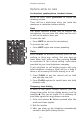
To change the LINE 1 (LINE 2) ringer volume:
• Adjust the LI (L2) ringer switch on the right side
of the telephone base.
NOTES:
• You can dial and answer calls normally with
one or both ringer switches set to off.
• Each line has its own distinctive ring.