
Manual






10
Getting started
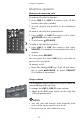
Data port & optional headset
If you want to connect another device (such as a modem or fax machine) to
the wall jack, use the jack labeled L2 or DATA on the back of the telephone
base. A call picked up at another extension on the line used by the data port
may interrupt a fax, modem or message transmission.
Data port
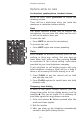
For hands-free telephone conversations, use any industry standard 2.5 mm head-
set (purchased separately). For best results, use an AT&T 2.5 mm headset. To order
an AT&T 2.5 mm headset, visit our website at www.telephones.att.com or call
1 (800) 222-3111. In Canada, dial 1 (866) 288-4268.
Plug 2.5 mm headset into
the jack on the right side
of the telephone base
(beneath the small rubber
flap).
NOTES:
• If the sound quality of the headset is unsatis-
factory, try unplugging it, and firmly plugging it
in again.
• Four AA alkaline batteries (purchased separate-
ly) must be installed in the telephone base for
the headset to work correctly in all conditions.
OPE R
PQR S
TUV
WXY Z
ABC
DEF
GHI
JKL
MNO
MIC