
User Manual Owner's manual


61
URL Filtering
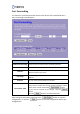
This function is used to restrict the data pass through a specified URL address.
Item Description
Enable URL Filtering Check the box to enable the URL filtering function.
URL Address
Set the URL address of the device that you want to restrict data
pass through.
Current Filter Table
The table lists the filtered URL addresses you have added.
If you want to remove one or more records, check the “Select”
boxes of the records and click the
button.
If you want to remove all the settings, click the
button.
Click the
button to uncheck all the boxes.
After setting the parameters, please click the button to save the
configurations, or click the button to reset the configurations before you
changed them.