
User Manual Owner's manual




21
Access
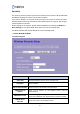
There are 2 types provided to access the multiple APs: “LAN+WAN”
and “WAN”. If you select “WAN”, LAN connection to the AP will be
disabled.
Active Client List
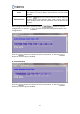
Click the
button in this column then you will see a pop-up
window named "Active Wireless Client Table" and the status of
active wireless clients that are connected to the AP listed in the
window.
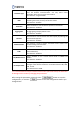
After setting the parameters, please click the button to save the
configurations, or click the button to reset the configurations before you
changed them.
Click the button to refresh the clients’ information, or click the
button to close this pop up window.
B. Associated Client
Click the button to refresh the clients’ information, or click the
button to close this pop up window.