
User manual


3838
3838
38
BIOS SETUP UTILITY
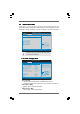
CPU Configuration
Select Screen
Select Item
+- Change Option
F1 General Help
F9 Load Defaults
F10 Save and Exit
ESC Exit
v02.54 (C) Copyright 1985-2003, American Megatrends, Inc.
Advanced
Select Screen
Select Item
+- Change Option
F1 General Help
F9 Load Defaults
F10 Save and Exit
ESC Exit
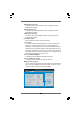
CPU Frequency (MHz)
PCIE Frequency (MHz)
Overclock Mode
[200]
[100]
[Auto]
Processor Maximum Multiplier
Processor Maximum Voltage
Memory Clock
Flexibility Option
[Auto]
[Disabled]
x10 2000MHz
1.400 V
Boot Failure Guard
CPU/LDT Spread Spectrum
PCIE Spread Spectrum
SATA Spread Spectrum
Cool'n'Quiet
[Enabled]
[Enabled]
[Enabled]
[Enabled]
[Auto]
Multiplier/Voltage Change
[Manual]
If AUTO, multiplier and
voltage will be left at the
rated frequency/voltage. If
Manual,
will be set based
on User Selection in Setup.
multiplier and
voltage
Processor Multiplier
Processor Voltage
[x8]
[1.500V]
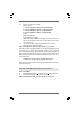
CPU/LDT Spread Spectrum
This feature will be set to [Enabled] as default. Configuration options:
[Disabled] and [Enabled].
PCIE Spread Spectrum
This feature will be set to [Enabled] as default. Configuration options:
[Disabled] and [Enabled].
SATA Spread Spectrum
This feature will be set to [Enabled] as default. Configuration options:
[Disabled] and [Enabled].
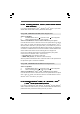
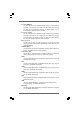
Boot Failure Guard
Enable or disable the feature of Boot Failure Guard.
Cool ‘n’ Quiet
Use this item to enable or disable AMD’s Cool ‘n’ Quiet
TM
technology. The
default value is [Auto]. Configuration options: [Auto], [Enabled] and
[Disabled]. If you install Windows
®
Vista
TM
and want to enable this function,
please set this item to [Enabled]. Please note that enabling this function may
reduce CPU voltage and memory frequency, and lead to system stability or
compatibility issue with some memory modules or power supplies. Please
set this item to [Disable] if above issue occurs.
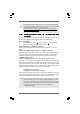
Processor Maximum Multiplier
It will display Processor Maximum Multiplier for reference.
Processor Maximum Voltage
It will display Processor Maximum Voltage for reference.
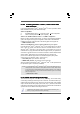
Multiplier/Voltage Change
This item is set to [Auto] by default. If it is set to [Manual], you may adjust the
value of Processor Multiplier and Processor Voltage. However, it is recom-
mended to keep the default value for system stability.