
Use & Care Guide

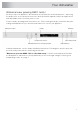
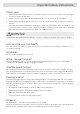

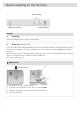
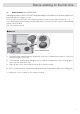
Table Of Contents
- Front page
- Contents
- Your dishwasher
- Important safety instructions
- Before washing for the first time
- Greener dishwashing
- Loading the dishwasher
- Using the dishwasher
- Add detergent
- The main power switch
- Select program
- Select program mode
- Select option
- Starting the dishwasher
- Time remaining
- Stopping or changing a program
- If you want to load more dishes
- If the dishwasher is turned off due to a power failure
- Once the program has finished
- How to get the best drying results
- Unloading the dishwasher
- Program chart
- Settings
- Care and maintenance instructions
- Troubleshooting
- Installation instructions
- Service
- Technical information

Confirm setting
Select setting
Main power switch
Settings
Language1.
Select the language to be shown on the display.
Rinse aid 0/1/2/3/4/5/TAB2.
Use rinse aid to improve wash and dry times. Also use rinse aid to achieve clear and spotless results.
Select rinse aid dosage. The rinse aid dispenser can be adjusted between 0 (Off) and 5 (High
dosage).
When using an all-in-one detergent that contains rinse aid, select the TAB setting. Read more about
all-in-one detergent in the chapter Using the dishwasher.
Pre-selected at factory: 5
Add rinse aid
Press to open
1. Open the rinse aid compartment lid.
2. Carefully top up with rinse aid to the level marked max.
3. Wipe up any spilled rinse aid around the compartment.
4. Close the lid firmly.
8
Before washing for the first time