
Installation and Maintenance






6 /
GB
3.
4.
5.
6.
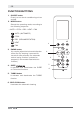
FUNCTION BUTTONS
1. ON/OFF button
Press it to turn the air conditioning unit on
and off .
2. MODE button
Selects the operating mode, according to
the following sequence:
> AUTO > COOL > DRY > HEAT > FAN
AUTO (AUTOMATIC)
COOL
DRY (DEHUMIDIFICATION)
HEAT
FAN
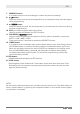
3. SWING button
It is used to adjust the horizontal direction
of the flap By keeping it pressed for
more than two seconds, the automatic
vertical swing function is started or
stopped (in the models fitted with this
function)
4. SLEEP / Follow me
It activates and deactivates the SLEEP
or Follow me functions.
5. TURBO button
It activates and deactivates the TURBO
function.
6. SELF CLEAN button
It activates the automatic cleaning
2.
7.
8.
9.
1.
10.
11.
12.
13.
14.