
How-To Guide
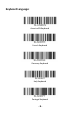
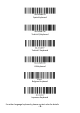

- 2 -
Important Notes:
• Make sure the device is in range with bluetooth.
• Scanner will power off if there’s no work within 1 minute.
• Pressing the scan button will initiate the attempts to connect.
Un-Pair Bluetooth :
Below two steps to unpair the bluetooth from previous device completely.
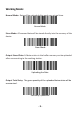
1.Scan Un-pair Bluetooth HID , Scanner disconnected from current device and
waits for other device to be paired.
2.Remove or Ignore"Argox Bluetooth" from your previous device.
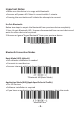
Un-Pair the Bluetooth
Bluetooth Connection Modes
Basic Mode (HID) (default)
• NO software installation is needed
• Connects to most devices
• Scanner interacts with host device like a keyboard
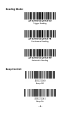
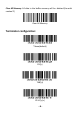
*Bluetooth HID(Basic Mode)
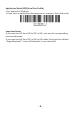
Application Mode (BLE)(Apple Specific Serial Profile)
• For iOS Devices
• Software installation is required
• If you have an application that supports our scanners, this is the mode
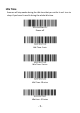
Bluetooth BLE