
Portable Multimedia Player User Manual


MANUAL
V3.0
GEN 5
TROUBLESHOOTING > P. 75
605 705
TOUCHSCREEN PROBLEMS
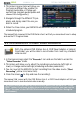
If the touchscreen is not responding
properly, or if it is not responding
at all, go to the “
Display” settings
screen.
Then use the “
Touch-Screen
Calibration
” button, and follow the
instructions on the screen.
See:
“Touch-Screen Calibration”
.
•
•
•
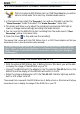
ARCHOS 705: If this does not work or if you cannot access the touchscreen
settings, you can force the touchscreen calibration (see: System Recovery).
REPAIR AND FORMATTING TOOLS
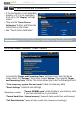
to access the “Repair and Formatting Tools” settings screen: from the Home
screen, select the “Settings” menu item, choose “System”, then use the “Repair
and Formatting Tools
” button. This screen allows you to do the following actions:
“
&OHDUWHPSRUDU\V\VWHP¿OHVDQGFDFKH” (does not erase any data)
“Reset Settings” (resets all user settings)
(Depending on model)
“Format SD/MMC card” (erase all data in your memory card,
if you have inserted one in your device)
-
“
Format Hard Drive / Internal memorynGTCUGCNNFCVCOGFKCÒNGUCPFNKEGPUGU
“
Full ReinitializationnGTCUGCNNFCVCOGFKCÒNGUNKEGPUGUCPFUGVVKPIU
-
-
-
-
-