
Portable Multimedia Player User Manual

MANUAL
V3.0
GEN 5
MAIN SETTINGS > P. 62
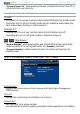
“Cancel”
use this button to discard any changes you may have made since entering this
screen.
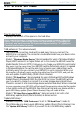
8.4 “LANGUAGE (AND REGION)” SETTINGS
“Language”
choose a language.
visit www.archos.com to check the availability of other languages. New lan-
IWCIGUCTGKPENWFGFKPVJGÒTOYCTGCUVJG[DGEQOGCXCKNCDNG5GG
Updating the
Firmware
.
605 705
“Select location”
if your clock is set to “
Automatic” (see
“Clock” Settings
), select your “Country”,
and “City/Zone”.
605 705
“WiFi Region”
VJKUKUEQPÒIWTGFCWVQOCVKECNN[CEEQTFKPIVQJQY[QWUGV[QWTNQECVKQP
8.5 “TV CONTROL” SETTINGS
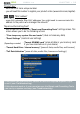
This is where you can set the DVR Station’s IR emitter to communicate with
your tuner. This will allow you to schedule recordings easily via the ARCHOS TV
Program Guide (EPG).
See the manual of the optional DVR Station Gen 5.
-
-
-
-
-
•
•