
Portable Multimedia Player User Manual


MANUAL
V3.0
GEN 5
CONNECTING TO A WIFI NETWORK > P. 47
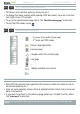
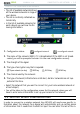
You will have to specify the following settings:
“Key length” (for WEP networks only)
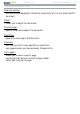
the authentication key can be 10 characters long (64bit) or 26 characters long
(128bit).
“Key format” (for WEP networks only)
in some cases you may need to change the key format in order to enter a pass-
phrase/password.
See the documentation that came with your WiFi router or
modem.
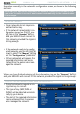
“Key” (WEP or WPA)
type in the authentication key.
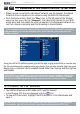
you will be taken to a virtual keyboard (see:
Using the Virtual Keyboard
).
type in the key and tap on “
OKnYJGP[QWJCXGÒPKUJGF
“Authentication” (for WEP networks only)
the network’s authentication method can be based on an “
Open System (de-
fault)
” or a “Shared Key”.
m%QPÒIWTCVKQPn
it can be “
Automatic (DHCP)” or “Manual”.
if it is “
Automatic (DHCP)”, then you do not have to enter any more information.
Simply use the “Connect” button, and your ARCHOS will connect to this network,
provided the signal is strong enough.
KH[QWOWUVEQPÒIWTGVJGPGVYQTMOCPWCNN[UGNGEVVJGm
Manual” setting. Other
parameters will appear: the required information can be obtained from the person
who manages the network.
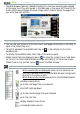
9JGP[QWJCXGÒPKUJGFGPVGTKPICNNVJGKPHQTOCVKQPWUGVJGmConnect” button, and
your ARCHOS will connect to this network, provided the signal is strong enough.
Filtered networks,I\RXUQHWZRUNPDQDJHUDOORZVRQO\VSHFL¿FGHYLFHVWR
FRQQHFWWRWKHQHWZRUNNQRZQDV0$&DGGUHVV¿OWHULQJ\RXFDQVXSSO\WKH
QHWZRUNPDQDJHUZLWKWKH0$&DGGUHVVRI\RXU$5&+267R¿QGRXWZKDW
your MAC address is, select the “Settings” menu item from the Home screen,
then choose “System”. See: “System” Settings.
-
-
-
-
-
-
-
-
-