
Instruction Manual



DV88
11
English
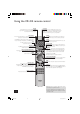
P MODE (play modes)
To set repeat or random playback, press
P MODE to access the ‘Play modes’ menu
(see page 12)
ANGLE SETUP STATUS SRCH
ZOOM AUDIO MEM RTN
P
MODE
SUBT TITLE MENU
SRCH (search)
It is possible to access any point on the disc
directly using the ‘Search’ menu.
Press SEARCH to access the ‘Search’ menu
(see page 12).
RTN (return)
Press RTN to move back through the DVD ‘Disc’
and ‘Title’ menus. Note that this feature is only of
use with discs using multi-level menus.
MENU
Press MENU to access the DVD ‘Disc’ menu.
This navigation menu is specifi c to a disc
and varies for each title, but typically offers
facilities to select chapters, languages, and
view extra material such as trailers or
documentaries.
Once the menu has been accessed, use the
cursor pad to move around the menu and
press
OK to activate a menu ‘button’.
STATUS
Press
STATUS once to show the elapsed and
remaining time of the disc. Press
STATUS a
second time to give information about the
current disc. Press
STATUS a third time to
close the status display.
The status information displayed varies
depending on the type of disc – DVD, CD or
VCD.
MEM (memorise)
It is possible to ‘bookmark’ up to three points
on a DVD title, so you can quickly jump to those
parts of the title in the future. Press
MEM to
access the ‘Bookmark’ menu (see page 13).
TITLE
Press TITLE to access the DVD’s
‘Title’ menu. Note that this feature only
applies to multi-title discs.
SETUP
‘Setup’ allows you to confi gure the DV88 for use
in your system. Ensure that no disc is playing
and press
SETUP to access the ‘Setup’ menu
(see page 6).
AUDIO
Some DVDs offer the facility to select
different audio tracks. Press AUDIO to cycle
through those available.
The TV displays the number, language and
type of audio track, e.g. ‘1 Eng DD 6CH’.
SUBT (subtitle)
Press
SUBT on the remote control to cycle
through the available subtitle languages,
including ‘OFF’. Some discs force subtitles
on, over-riding player set up.
ANGLE
Some DVDs offer the facility to select different
camera angles. If this feature is available the
‘camera’ symbol lights in the display.
Press
ANGLE to cycle through the available angles.
ZOOM
Press ZOOM to enlarge a particular area of
the picture. Up to three levels of zoom are
available, but the amount of zoom possible
varies depending on the type of disc: in some
cases no zooming is possible (in which case
a hand symbol appears).
If available, pressing
ZOOM cycles through
levels 1, 2 and 3, returning to normal size
with a further press.
While using the zoom function, the cursor
pad can be used to move around within the
image. The zoom function can also be used
when the player is paused.
Advanced controls
DV88 multi.id 03/29/01, 1:03 PM11