
Instruction Manual



DV88
10
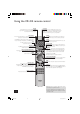
Using the CR-314 remote control
OK
ANGLE
CD DVD
SETUP STATUS SRCH
ZOOM AUDIO MEM RTN
P
MODE
SUBT TITLE MENU
RPT CLEAR
0
PROG
A-B
7
8
9
DISP
4
56
CD
DVD
1
2
3
MUTE
OPEN
CD/DVD REMOTE
CR-314
CD/DVD
Ensure that DVD mode is selected using the CD/DVD
toggle button. The ‘DVD’ LED above the
CD/DVD button
is lit briefl y when DVD mode is selected.
DISP (display)
Dims or turns the DV88’s display on or off. Turning the display off
generally gives a slight improvement in sound quality.
Pressing
DISP once turns the display off; twice dims the display.
To restore the display to full brightness, press
DISP a third time.
A–B
This button enables you to repeat a selected
section from the disc (see page 13).
RPT (repeat)
Press RPT to cycle through the repeat play options;
alternatively use the ‘Play modes’ menu.
CLEAR
Use CLEAR within the ‘Program’ and ‘Bookmark’ menus to clear
a numeric fi eld (see pages 12–13).
0–9 keypad
This allows direct access to individual tracks on audio CDs. To
select a track, press the corresponding keypad button followed
by
OK. For tracks greater than 9, enter the digits in sequence.
For example, to play track 15, press 1, then 5, then
OK.
PROG (program)
You can program a selection of up to 16 chapters/tracks from
a disc to play in any order. Press
PROG to access the ’Program’
menu (see page 12 and 14).
MUTE
Stops sound to the speaker outputs of certain Arcam amplifi ers.
Volume +/–
Adjusts the volume on Arcam remote-controllable amplifi ers.
Note that the volume (+/–) controls and
MUTE button have no
effect on the audio output level of the DVD players.
NOTE: Remember to install the two AAA batteries supplied
before trying to use your remote control.
Do not place anything in front of the display area on the
DVD player (where the IR receiver is located), or the remote
control may not work.
OPEN
Opens and closes the disc tray.
Slow play
Press or on the remote control to play slow forward
or backwards. There are six speeds of slow playback: 1/7,
1/6, 1/5, 1/4, 1/3 and 1/2. Press the button repeatedly
to cycle through the different speeds. To resume normal
playback speed, press PLAY.
Note that slow play does not apply to audio CDs.
Cursor pad and OK button
Use the cursor pad to navigate the On Screen Display (OSD) and
menu pages. Confi rm your selection with the
OK button.
Playback control
Pause ( ), Play ( ) and Stop ( ) (see page 9).
Note that when a DVD disc menu is displayed, the playback
controls (including
and ) duplicate the function of the
cursor pad and
OK button.
Fast play and Skip chapter/tracks
Play fast ( ) and Skip ( ) chapters/tracks in both
directions (see page 9).
Advanced controls
These buttons are described on the facing page.
Standby
Press Standby to toggle the standby state of the DVD player.
Note that Arcam CD players are not controlled by this button.
DV88 multi.id 03/29/01, 1:03 PM10