
Operation Manual


Table Of Contents
- Contents
- 1 Getting Started With the QuickTake 100 Camera
- 2 Using the Camera to Take Pictures
- 3 Using the Camera With Your Macintosh
- 4 QuickTake Software Menu Commands
- 5 Maintenance and Troubleshooting
- Appendix A Specifications
- Appendix B Battery Information
- Appendix C Using the Camera with a Windows-Based PC
- Appendix D Using QuickTake Setup
- Index
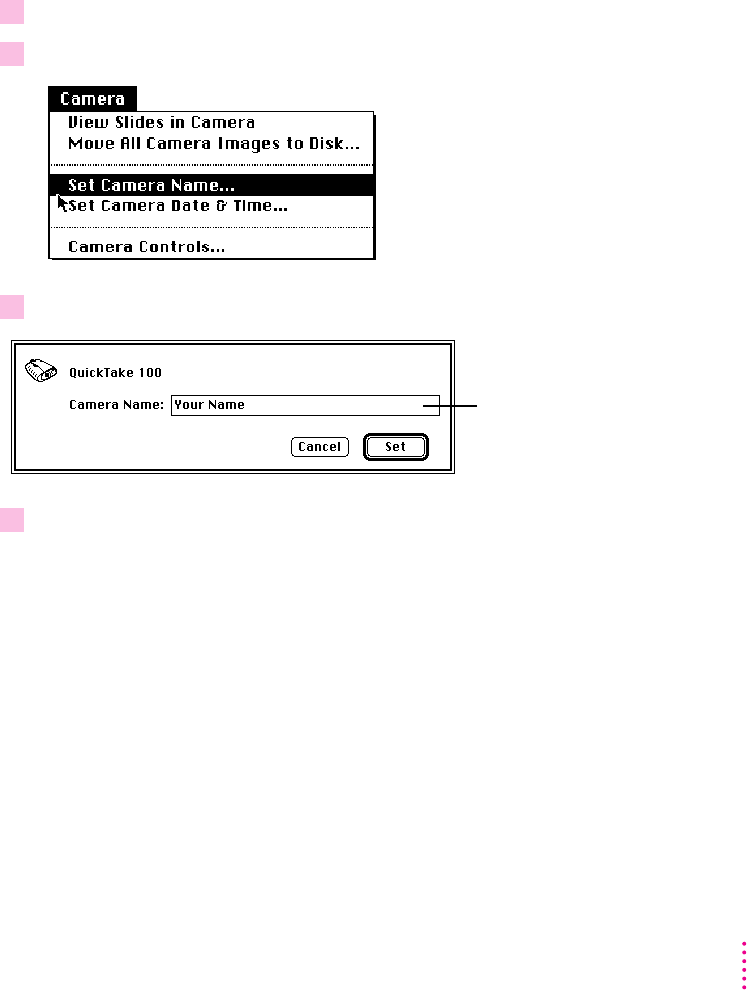
Naming the camera
You can give your camera a name. When you look at the pictures while
they’re on the camera, its name appears as the title of the slide table window.
The camera must be connected to your Macintosh. For instructions, see
“Connecting the Camera to Your Macintosh,” earlier in this chapter.
1 On your Macintosh, double-click the QuickTake icon to open it.
2 Choose Set Camera Name from the Camera menu.
3 In the box that appears, type the name you want.
4 When you’re finished, click Set.
35
Using the Camera With Your Macintosh
The name you type
can contain up to
31 characters.