
Operation Manual


Table Of Contents
- Contents
- 1 Getting Started With the QuickTake 100 Camera
- 2 Using the Camera to Take Pictures
- 3 Using the Camera With Your Macintosh
- 4 QuickTake Software Menu Commands
- 5 Maintenance and Troubleshooting
- Appendix A Specifications
- Appendix B Battery Information
- Appendix C Using the Camera with a Windows-Based PC
- Appendix D Using QuickTake Setup
- Index
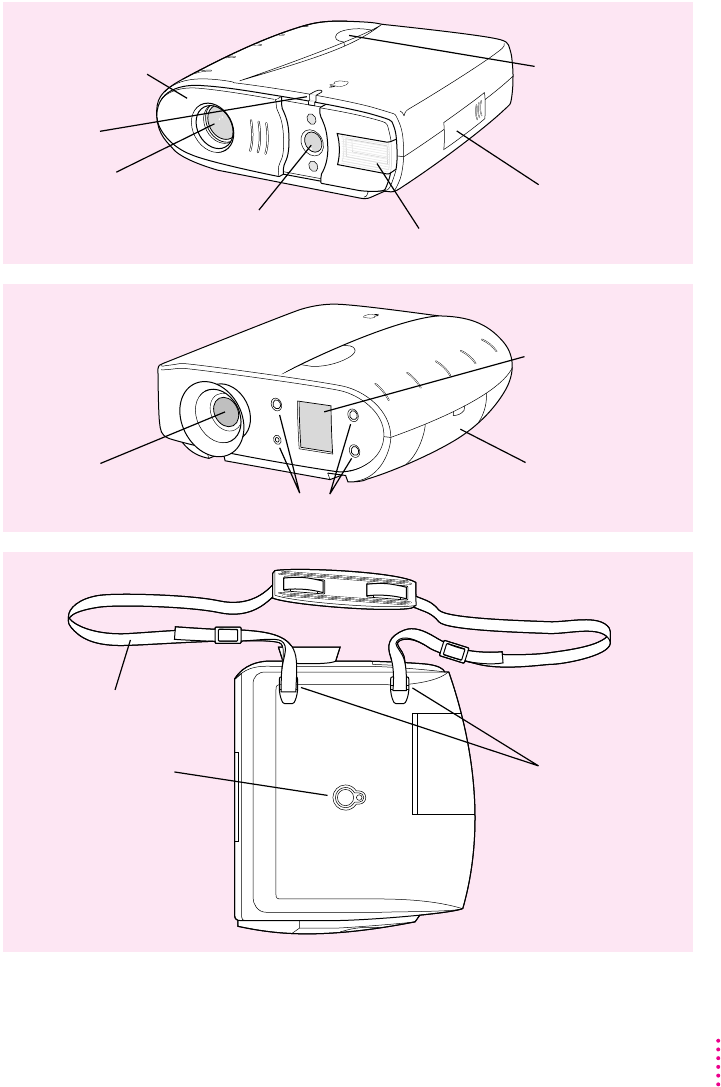
Your camera at a glance
This illustration shows the front, rear, and bottom of the camera.
Shutter release
Serial port and
power adapter port
(behind the cover)
Sliding lens cover
(opened)
Camera lens
Viewfinder lens (with light sensors
above and below, for the light meter) Built-in flash
Viewfinder Battery compartment
Control buttons
Control panel display
Timer light
Adjustable neck strap
Tripod mounting hole Neck strap
attachment points
Front view
Rear view
Bottom view
3
Getting Started With the QuickTake 100 Camera