Computer ATA Cable Replacement Instructions
Manuals
Brands
Apple Manuals
Desktop
Power Mac 073-0708
1
2
3
4
5
6
7
Power Mac G4 (Mirrored Drive Doors/FW 800) ATA Cable -
3
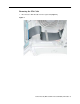
Removing the
A
T
A Cable
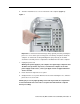
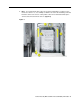
1.
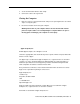
Disconnect the A
T
A 100 cable from the logic board.
(Figure 2)
Figure 2
1
2
3
4
5
6
...
7