System information
Manuals
Brands
Apple Manuals
Computers
Pavilion dv4-4200
71
72
73
74
75
76
77
78
79
80
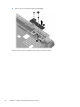
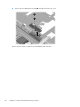
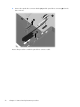
3.
Remove the optical dr
ive c
onnector br
acket
(3)
and the optical drive connector
(4
)
from the
base enclosure.
Reverse this procedure to install
the optic
al drive connector cable.
72
Chapter 4 Removal and replacement p
rocedures
1
...
...
78
79
80
81
82
...
...
135