
Specifications





12Nike+ Basketball/Training User’s Guide
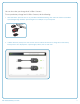
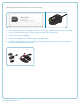
To identify which Nike+ Sport Sensor you are viewing:
1. Click a Nike+ Sport Sensor image in Connect. In the Nike+ Sport Charger, the corresponding
sensor’s LED will blink green, while the other sensor’s LED switches off.
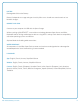
2. Click OK to continue charging.
3. When fully charged, the LED will continuously glow green.
4. Remove the Nike+ Sport Sensors from the charger and insert them into the sensor bed of
your Nike+ Basketball/Training shoes.