
Manual



3 If desired, type in a title for the calculation document.
Note:
This title doesn’t appear when you print a calculation document.
4 Press Return or tap X.
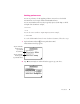
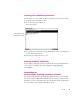
Here’s an example of a typical calculation document.
2 Chapter 1
I
f
y
o
u
p
l
o
t
t
h
e
c
a
l
c
u
l
a
t
i
o
n
,
i
t
a
pp
e
a
r
s
h
e
r
e
.
E
n
t
e
r
t
h
e
c
a
l
c
u
l
a
t
i
o
n
s
i
n
t
h
e
m
a
t
h
w
i
n
d
o
w
.
V
i
e
w
t
h
e
o
u
t
p
u
t
i
n
t
a
b
u
l
a
r
f
o
r
m
a
t
.
T
a
p
t
h
e
R
o
u
t
i
n
g
b
u
tt
o
n
t
o
p
r
i
n
t
,
s
e
n
d
,
d
u
p
l
i
c
a
t
e
,
o
r
d
e
l
e
t
e
a
c
a
l
c
u
l
a
t
i
o
n
d
o
c
u
m
e
n
t
.
T
a
p
N
e
w
t
o
c
r
e
a
t
e
a
n
e
w
c
a
l
c
u
l
a
t
i
o
n
d
o
c
u
m
e
n
t
.
T
a
p
t
h
e
F
o
l
d
e
r
b
u
tt
o
n
t
o
f
i
l
e
t
h
e
c
a
l
c
u
l
a
t
i
o
n
d
o
c
u
m
e
n
t
i
n
t
o
a
f
o
l
d
e
r
.
I
f
d
e
s
i
r
e
d
,
t
y
p
e
a
t
i
t
l
e
h
e
r
e
.
W
h
e
n
y
o
u
’
r
e
f
i
n
i
s
h
e
d
,
t
a
p
h
e
r
e
o
r
p
r
e
ss
R
e
t
u
r
n
.
T
a
p
t
h
e
I
n
f
o
r
m
a
t
i
o
n
b
u
tt
o
n
t
o
g
e
t
h
e
l
p
,
s
e
t
p
r
e
f
e
r
e
n
c
e
s
,
o
r
f
i
n
d
o
u
t
m
o
r
e
a
b
o
u
t
t
h
e
g
r
a
p
h
i
n
g
c
a
l
c
u
l
a
t
o
r
a
pp
l
i
c
a
t
i
o
n
.