
User`s guide



CHAPTER 6
Pickers, Pop-up Views, and Overviews
6-18 Date, Time, and Location Pop-up Views
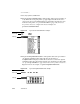
■ The protoDateNTimePopup allows the user to choose a single date and time.
For information about the slots and methods for this proto, see
“protoDateNTimePopup” (page 5-67) in Newton Programmer’s Reference.
Figure 6-25 shows an example of a
protoDateNTimePopup.
Figure 6-25 A protoDateNTimePopup example
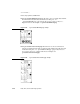
■ The protoDateIntervalPopup allows the user to choose an interval of
dates by specifying the start and stop dates. For information about the slots and
methods for this proto, see “protoDateIntervalPopup” (page 5-69) in Newton
Programmer’s Reference. Figure 6-26 shows an example of a
protoDateIntervalPopup.
Figure 6-26 A protoDateIntervalPopup example