
Manual
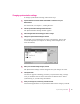
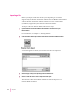

4 Click Choose.
A window appears with a list of translators you can use.
5 Select the file you want to synchronize.
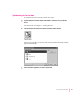
6 Click OK.
The window disappears and the name of the file you’re synchronizing
appears in the Synchronization Settings window.
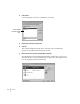
7Make sure the box to the left of the application is selected.
Each application in the Synchronization Settings window has a box next to it.
You click this box to turn synchronization on and off. If a mark appears in the
box, the application will be synchronized.
54
Chapter 7
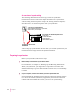
A list of available
translators appears
here.