
Instruction Manual
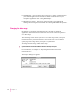
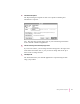
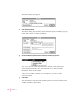
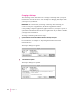

The Import dialog box appears.
2Click Advanced Options.
The Import dialog box expands to show advanced options, including a pop-up
menu with a choice of conflict resolutions.
3Choose the desired conflict resolution from the On Conflict pop-up menu.
Note: The contents of this menu depend on whether you’re importing or
synchronizing information. For more information, see “About Conflict
Resolution” earlier in this chapter.
After you set conflict resolution, you can import or you can set other
advanced options.
4 Click Import.
The information is imported and conflicting entries are resolved based on the
conflict resolution you specified.
78
Chapter 10