
Instruction Manual

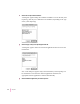


3 Select a file to import and click Select.
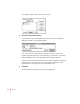
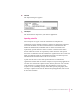
A dialog box appears listing the translators available to convert the file you’re
importing. (You may see a different list of translators, depending on the type
of file you’re importing.)
4Select the type of file you’re importing and click OK.
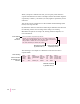
A dialog box appears with a list of Newton applications that can receive the
information.
Note: This dialog box appears only if the information you’re importing can
be transferred to more than one Newton application. Otherwise, the
appropriate Newton application is selected automatically.
5Select the Newton application you want to import to.
46
Chapter 5