
Instruction Manual



Ending a keyboard session
When you’ve finished entering information from the keyboard, you can end a
keyboard session by any of the following methods:
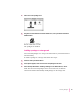
m On your computer, click the Stop button in the Keyboard status window.
m On your Newton device, tap the Dock button. When a message appears
asking whether you want to end your keyboard session, tap Yes.
m Tap the star (
✩) at the top of your Newton screen and tap Dock. When a
message appears asking whether you want to end your keyboard session,
tap Yes.
Copying text from the Clipboard
During a keyboard session, you can copy text from your computer’s Clipboard
to your Newton device.
To copy text from the Clipboard, follow these steps:
1 Open the Newton Connection Utilities and start a keyboard session.
For instructions, see “Starting a Keyboard Session” earlier in this chapter.
2 On your computer, copy text to the Clipboard.
3Set the insertion point on your Newton device.
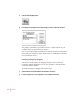
4Click the “Paste from Clipboard” button in the Keyboard status window.
Te xt from the Clipboard appears on your Newton device.
Note: You can also paste text by typing x-V on your computer’s keyboard.
When you copy text to your Newton device:
m Graphics are not copied.
m The “Paste from Clipboard” button is dimmed if the Clipboard contains
no text.
m It may take a few seconds for large amounts of text to appear on your
Newton device.
40
Chapter 4