
Instruction Manual

Connecting with a serial cable
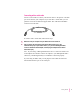
You use a serial cable to connect your Newton device to the printer or modem
port on the back of your computer. If you don’t have a serial cable, you can
purchase one from an authorized Apple dealer. The cable has mini DIN-8
connectors on both ends.
To connect with a serial cable, follow these steps:
1Make sure both your computer and your Newton device are turned off.
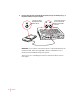
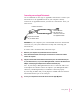
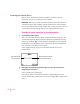
2Plug one end of the serial cable into the Newton InterConnect port (or the
Communication port) on your Newton device (or, if you have a MessagePad 2000,
connect to the Newton Serial Adapter, and then plug the adapter into the Newton
InterConnect port).
Note: If you’re using a MessagePad 2000, be sure to connect the cable to the
serial adapter first and then connect the adapter to your MessagePad 2000—
otherwise, your MessagePad may not establish a connection properly.
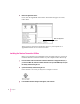
If you’re using an eMate 300, you can plug the serial cable into either the
Newton InterConnect port or the serial port.
3
Getting Started