
Instruction Manual
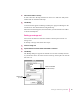
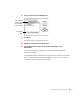
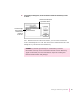

4Make sure the card you want to back up is selected.
5Click Backup.
The card is backed up and a backup file with the name of the card appears in
your Backups folder.
Changing the location of the Backups folder
By default, the Backups folder is automatically stored in the Newton
Connection Utilities folder on your computer.
To change the location of the Backups folder, follow these steps:
1 Open the Newton Connection Utilities.
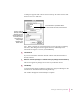
2Choose Preferences from the Edit menu.
A dialog box appears.
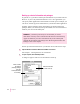
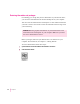
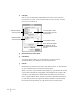
3Click Set in the Backups folder box.
A dialog box appears.
26
Chapter 2
Click to change the
location of the
Backups folder.
Shows the current location of
the Backups folder