
Owner's manual





6When you see a message reporting that the installation was successful, follow the instructions
on screen.
Yo u’ ll find a folder named Newton Backup Utility on your hard disk.
Preparing your computer
To prepare your computer for communication with a Newton PDA, follow these
steps.
Opening the Newton Backup Utility
To open the utility:
m
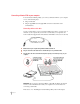
On your computer, open the Newton Backup Utility folder and double-click the Newton
Backup Utility icon.
The Newton Backup Utility window appears on your computer.
5
Getting Started
Buttons are dimmed
until you establish a
connection from your
Newton PDA.
Displays connection
messages and other
information
Newton Backup Utility menus