
Owner's manual





4
Chapter 1
Installing the Newton Backup Utility
Before your computer can communicate with your Newton PDA, you need to install
the Newton Backup Utility on your computer. Follow these steps.
1 Insert the
Install 1
disk for the Newton Backup Utility into a floppy disk drive.
If necessary, open the disk icon.
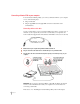
2Double-click the Install NBU icon to open it.
3 In the Installer Welcome dialog box that appears, click Continue.
4 In the Install NBU dialog box, click Install.
A status box keeps you informed of progress during installation.
5 Follow the instructions on your screen.
Yo u ’ ll be instructed to insert another disk.
Double-click to install the
Newton Backup Utility.
The folder where the
Newton Backup Utility
will be installed
Click to start the
installation.