
Owner's manual





Connecting over an AppleTalk network
Use a LocalTalk or other type of AppleTalk connection kit to connect your Newton
PDA to an AppleTalk network. If your computer is already connected to an
AppleTalk network, you need one connection kit. If not, you need
two kits.
IMPORTANT
If your computer is part of an EtherTalk network or another kind of
network, see your system administrator for help with connecting your Newton PDA.
1Make sure your computer and your Newton PDA are turned off.
2 Follow the instructions that came with your connection kit to connect the AppleTalk cable to the
computer.
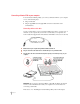
3Plug the AppleTalk cable into the communication port on your Newton PDA.
4 Turn on your computer and choose the Chooser from the Apple (
K
) menu.
5Make sure AppleTalk is active.
If not, click the AppleTalk Active button. If instructions appear on screen, follow
them.
That’s it! You’ve connected your Newton PDA to your computer on a AppleTalk
network.
3
Getting Started
Make sure AppleTalk
is active.