
Owner's manual





Connecting a Newton PDA to your computer
To use the Newton Backup Utility, you connect your Newton PDA to your computer
in one of the following ways:
m using a serial cable
m using an AppleTalk network (AppleTalk connection is faster than serial
communication)
Connecting with a serial cable
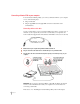
You use a serial cable to connect your Newton PDA to the printer or modem port on
the back of your computer. If you don’t have a serial cable, you can purchase one
from an authorized Apple dealer. The cable has mini-DIN-8 connectors on both ends.
1Make sure both your computer and your Newton PDA are turned off.
2Plug one end of the serial cable into the communication port on your Newton PDA.
3Plug the other end of the serial cable into the printer port (
[
) or the modem port (
W
) on your
computer.
IMPORTANT
If you connect your Newton PDA to a PowerBook that has an internal
modem, see the manual that came with your computer for more information on
connecting a serial cable.
That’s it! Go on to “Installing the Newton Backup Utility,” later in this chapter.
2
Chapter 1