
Owner's manual
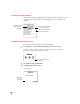


4Tap the information button and choose Prefs from the list of choices.
A slip appears with a list of connection preferences.
Some of these preferences are used by the Newton Backup Utility and some
preferences are used by other connection applications.
5Select the desired connection preferences.
6Tap
X
to close the slip.
Your connection preferences are saved and will be used when you connect your
Newton PDA to your computer.
27
Using the Utility From Your Newton PDA
Select to end a
connection if no
activity occurs for
about one minute.
Select to automatically back up all
information and packages when you
tap Backup.
Not used by the
Newton Backup Utility