
Owner's manual
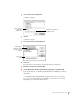





4 Drag the icons to the Newton Backup Utility icon on your desktop.
Installing a package on a storage card
You can install packages on a storage card rather than in your Newton PDA’s internal
memory.
1 Insert the card in your Newton PDA.
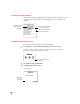
2 In the slip that appears, select “Save new info and packages on this card.”
3 Follow the steps described in the previous section, “Installing a Package On Your Newton PDA.”
With “Save new info and packages on this card” turned on, the Newton Backup
Utility automatically installs packages on the storage card.
23
Installing Packages