Specifications
Manuals
Brands
Apple Manuals
Computer Accessories
MULTIPLE SCAN 15AV
31
32
33
34
35
36
37
38
39
40
Take Apart
Tilt-Swivel
Stand -
6
1
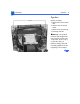
Place the monitor face-
down on a padded surface
with the bottom of the
stand facing you.
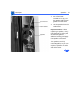
2
Press inward on both
tabs on the sides of the
stand.
Tilt-Swivel Stand
Tab
Tab
1
...
...
29
30
31
32
33
...
...
142