
User`s guide



Take Apart Transfer Block Assembly - 145
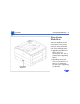
1 For clearance purposes, loosen the nine silver-colored
screws and the one upper black screw about 1/8 inch
and shift the front wall outward.
2 Remove the screw facing out through the fuser door that
secures the feeder guide to the chassis.
3 Pry under the toner-side edge of the assembly with a
small flat-blade screwdriver and release the five tabs
that secure the transfer block assembly to the chassis.
4 Note: The underside of the transfer block assembly has
several contact pins that extend down into the high-
voltage power supply and tend to snag during removal.
Be careful not to damage them as you perform the
following step.
Lift the assembly straight upward about 2 inches and
shimmy it out the toner side of the printer.