User`s guide
Manuals
Brands
Apple Manuals
Computer equipment
LaserWriter Pro 630 Envelope Feeder
151
152
153
154
155
156
157
158
159
160
Take Apart
Right Corner Panel
-
29
2
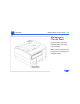
Reach into the access
hole as shown in the
photo at the left, and
release the hidden flex
tab.
3
Remove the right corner
panel from the printer.
Right
Corner
Panel
Access
Hole
1
...
...
153
154
155
156
157
...
...
296