
User`s guide


2
2
2
222
2
Flowcharts and Tables
Troubleshooting
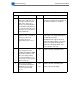
Table 13. Uniformly Light/Faded Image Over Entire Page
Step Check Result Action
1 Adjust the density using the
Printer Utility. Does the
problem persist?
No Problem solved.
2 Try printing with
known-good paper. Does
the problem persist?
No Problem solved.
3 Replace the transfer roller
with a known-good transfer
roller. Does the problem
persist?
No Problem solved.
4 Have you recently serviced
the printer and has this
symptom existed ever
since?
Yes Confirm that the high-voltage power
supply is installed correctly and that
good contact is being made with the
transfer block assembly.
5 Remove the rear panel and
I/O shield. Place probes
between J210-9 (SLO2)
and J210-10 (GND) and
switch on the printer. Does
the voltage read about
0.7 V about one second
after the main motor starts?
No
Ye s
Replace the DC controller.
Replace the high-voltage power
supply. If the problem persists, replace
the high-voltage connector board.