
Technical information
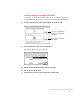


Choosing a printer on a non-AppleTalk network
You can also use the Desktop Printer Utility to choose a printer that is not on
an AppleTalk network; however, you’ll need to know the printer’s IP address.
1 In the Desktop Printer utility, select Printer (LPR) from the list and click OK.
2 In the Internet Printer section, click the Change button.
The Internet Printer dialog box appears.
3Enter the printer’s IP address and queue name, then click OK.
4Choose Save from the File menu.
5Enter a name and location for the desktop printer icon and click OK.
41
Setting Up the Printer for Mac OS Users
To select a PostScript Printer
Description file for the printer,
click Change.
To select a printer to print on,
click Change.