
Technical information


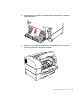


2 Open the duplex printing unit’s lower back door to see whether the jam is around the
paper guide for the duplex printing unit. If so, gently pull out the jammed paper.
Note: If you opened the duplex printing unit’s top or back door, it is not
necessary to open and close the top cover to reset the printer.
Avoiding paper and envelope jams and wrinkling
Some papers or envelopes may jam or wrinkle as they pass through the
printer.
If you experience paper jams, loosen up the stack of paper by fanning it
before you load it into the paper cassette. Be sure not to overload the cassette.
With stiffer paper stock, try printing the paper from the multipurpose tray,
which provides a straighter feed into the printer than the cassettes.
200
Chapter 11