
Technical information


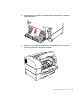


3 Once you have removed the jammed paper, reinsert the toner cartridge and close the
top cover.
Note: You must open and close the top cover to reset the printer.
4 Remove the paper cassette to see whether the jam is in the paper cassette area. If so,
gently release or pull out the jammed paper.
Check that all paper edges are under the bracket at the front of the cassette.
Paper edges over the bracket are also considered paper jams.
5Check the paper exit area on top of the printer to see whether the paper is jammed there.
If so, gently pull the paper out.
196
Chapter 11