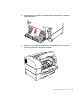
1 Open the back door of the printer to see whether paper is jammed there. If so, gently pull
out the jammed paper.
2 Open the top cover of the printer and remove the toner cartridge. If the jam is around the
pressure roller area, remove the paper as shown here:
195
Fixing Paper and Image Problems