
Technical information


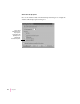


Details
Click the Details tab to display the Details tab dialog box, which controls the
printer port. The Details tab is available only when you open the printer
Properties dialog box from the Printers folder.
180
Chapter 8
Removes a port from a network path
Maps a port to a
network path
Specifies how long
Windows 95 waits
for the printer to be
ready before
reporting an error
Specifies how long Windows 95 waits
for the printer to be online before
reporting an error
Adds a new port or specifies
a network path