
Specifications



CHAPTER 1
Introduction to the LaserWriter 16/600 PS Printer
10
Configuration Switch
When the switch is in the up position (user-defined), any changes made to the communi-
cation parameters will affect the next print job. See Chapter 2, “LaserWriter 16/600 PS
Software,” for further information about the communication parameters. Table 1-4
shows the default parameter values for the configuration switch.
The configuration switch gives users connected to the parallel port of the LaserWriter
16/600 PS printer a way to recover from a situation where the LaserWriter Utility
cannot communicate with the printer. For example, when the configuration switch
is in the up position and the parallel port communication parameters are set to PCL5,
the LaserWriter Utility cannot send commands to the printer because the utility uses
PostScript commands rather than PCL5 commands to modify printer behavior. Moving
the switch to the down position returns the parallel port to the AutoSelect mode. In this
mode, the parallel port is automatically configured for the PostScript data stream from
the LaserWriter Utility.
You can find out what the setting of the current switch position is by
■
using the PostScript Level 2 system parameter
PrinterMode
■
choosing Configure Communication from the Utilities menu of the Apple Printer
Utility program
■
looking at the configuration switch on the back of the printer
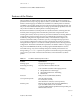
Table 1-4
Configuration switch default parameter values
Setting Port name
Type of connection and
default parameter values Interpreter
Preset
(Down, logical 0)
9-pin mini-DIN LocalTalk PostScript
36-pin parallel
(IEEE 1284)
Centronics (IEEE 1284), fast mode
Protocol: Raw
AutoSelect
Ethernet EtherTalk
NetWare
TCP/IP
PostScript
AutoSelect
AutoSelect
User defined
(Up, logical 1)
9-pin mini-DIN LocalTalk PostScript
36-pin parallel Centronics (IEEE 1284), fast mode
Protocol: Normal
PostScript
Ethernet EtherTalk
NetWare
TCP/IP
PostScript
PostScript
PostScript