
Specifications





CHAPTER 1
Overview of LaserWriter Pro Hardware
Communication
5
Serial Port for RS-232C Devices 1
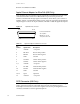
A 9-pin sub-mini-DIN connector supports communication with RS-232C devices.
Figure 1-2 shows the connector pin designations, and Table 1-2 lists the pin functions for
the 9-pin connector.
Figure 1-2
9-pin serial port connector for RS-232C device
Table 1-2
Signal descriptions for 9-pin serial port
Pin
number Signal name Description
1 DCD Data carrier detect. If printer is used with modem, shows
that the carrier signal is present.
2 /RXD Receive data (inverted)
3 /TXD Transmit data (inverted)
4 DTR Data terminal ready. Send data when this signal is asserted.
5 GND Ground
6 DSR Data set ready. Indicates the modem is ready. Not used with
the LaserWriter Pro printer.
7 RTS Request to send. Flow control signal.
8 CTS Clear to send. Flow control signal.
9 RING Ring signal
1 2 34
5
6
7
8
9