
Specifications




• Remove the plastic cable retainer (under the fan).
• Remove the neck cap spoke retainer.
• Remove the blind mate connector screws.
Procedure
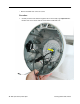
1. Note: To make sure the computer is oriented correctly before taking the unit apart any
further, the speaker should be on the left and the blind mate connector on the right,
and the two black screws should be in these locations (shown below).
2. Bundle the neck cables to one side (as shown). Supporting the base, remove the two
black screws. These screws connect the neck to the base assembly.
68 iMac (Flat Panel) Take Apart
Chassis (Faraday Cage)