
Specifications


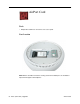


3. Gently insert the memory module into the slot. You will hear a click when the memory
is completely inserted into the slot. Note: Make certain to push the memory module in
the direction of the arrows.
4. Press down gently on the memory until you hear it click into place under the two
locking tabs (circled below) on the sides of the slot.
6 - iMac (Flat Panel) Upgrades
Memory, SO-DIMM